Composer
A multi-agent orchestration platform that manages a team of specialized AI agents — designer, reviewer, implementer, tester, documenter — to autonomously design, build, review, and ship production software around the clock.
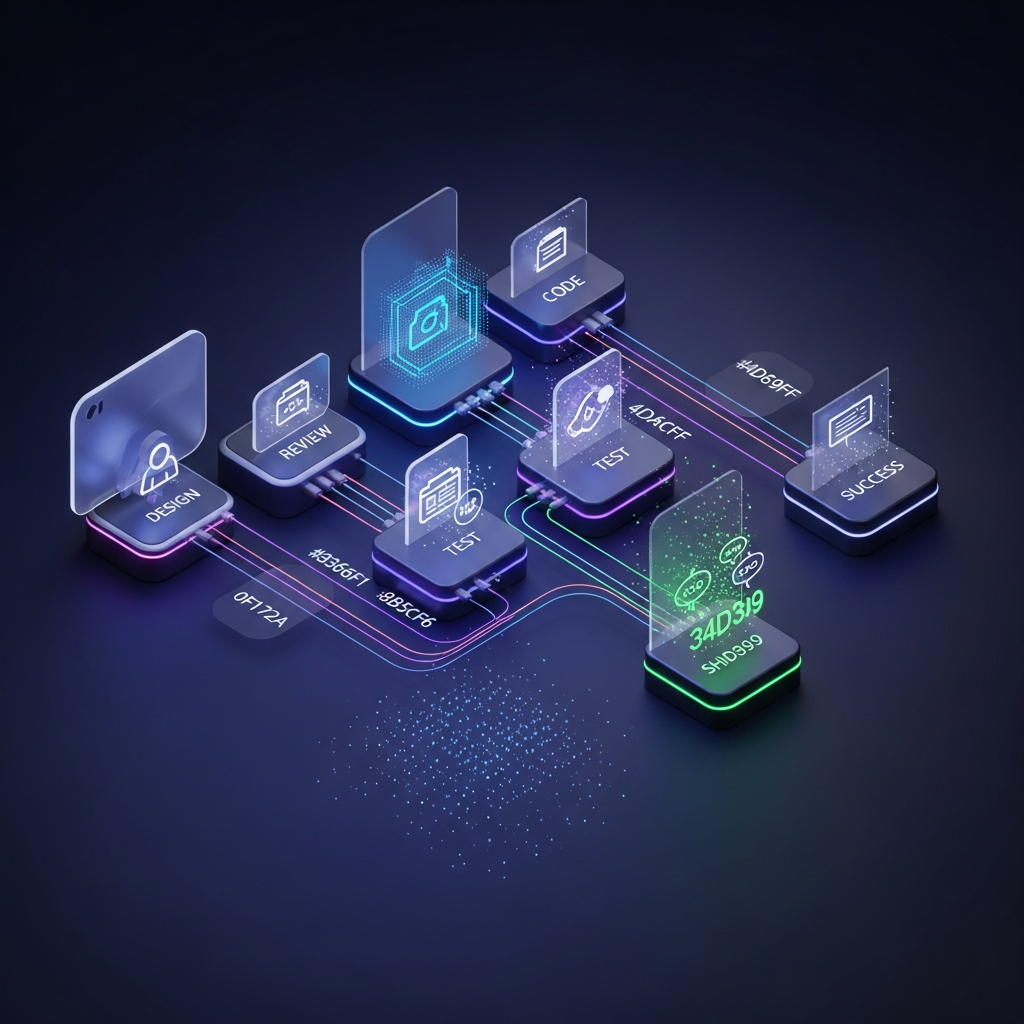
Composer: An Autonomous One-Person AI Software Company
What if you could hire a full software engineering team — a designer, an architect, a developer, a code reviewer, a QA engineer, a technical writer, and a project manager — and have them work around the clock, shipping production code while you sleep?
That's Composer. Not a chatbot. Not a code completion tool. A work queue and orchestration platform that manages a team of specialized AI agents, each with their own role, their own instructions, and their own definition of "done." You describe what you want built. Composer breaks it into phases, assigns the right specialist, enforces quality gates, and ships the result — autonomously.
The thesis is simple: the future of software development isn't writing code. It's managing the agents that write it. The missing abstraction was never a smarter model — it was a better work queue.
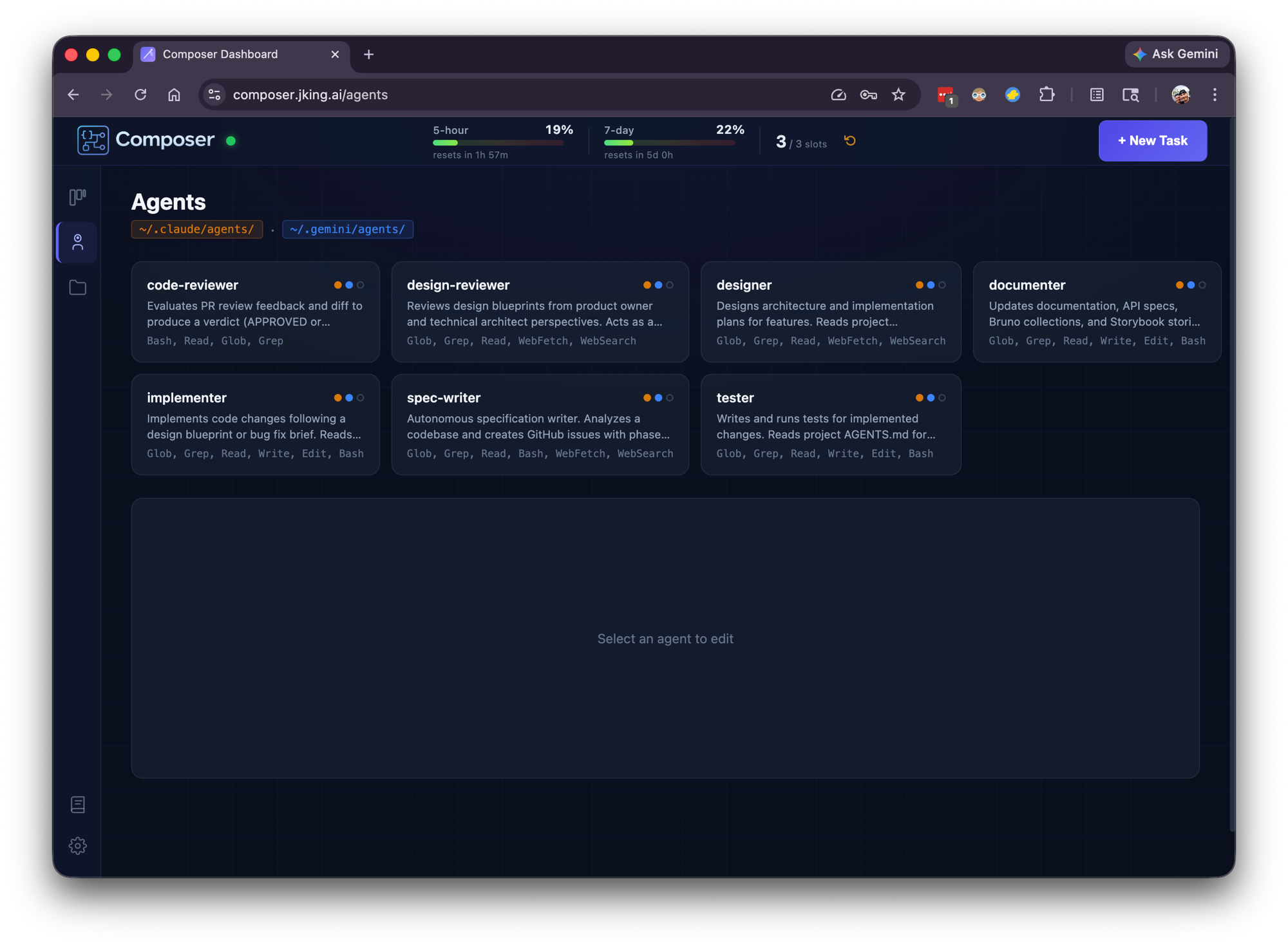
The Team
Think of Composer as a small software company where every employee is an AI agent:
| Agent | Role | What They Do |
|---|---|---|
| Designer 🎨 | Functional analyst + software architect | Reads the codebase, plans the approach, identifies files to change, creates a blueprint |
| Design Reviewer 🔍 | Product owner + lead architect | Reviews the design for quality, completeness, and feasibility — can send it back for revisions |
| Implementer ⚙️ | Software developer | Writes the code, runs linting and builds, commits to a branch, opens a pull request |
| Tester 🧪 | QA engineer | Writes and runs tests — unit, integration, edge cases |
| Documenter 📝 | Technical writer | Updates READMEs, API docs, project documentation, and in-app help |
| Code Reviewer 🔎 | Senior engineer | Reviews the Implementer's pull request, checks CI status, iterates with feedback until the code passes |
| Spec Writer 📋 | Business analyst + project manager | Analyzes a codebase and creates phased GitHub issues with detailed implementation plans |
Each agent is a separate AI session with specialized instructions, a focused perspective, and strict boundaries. They don't share context — they communicate through artifacts, just like a real team communicates through design docs, pull requests, and code reviews.
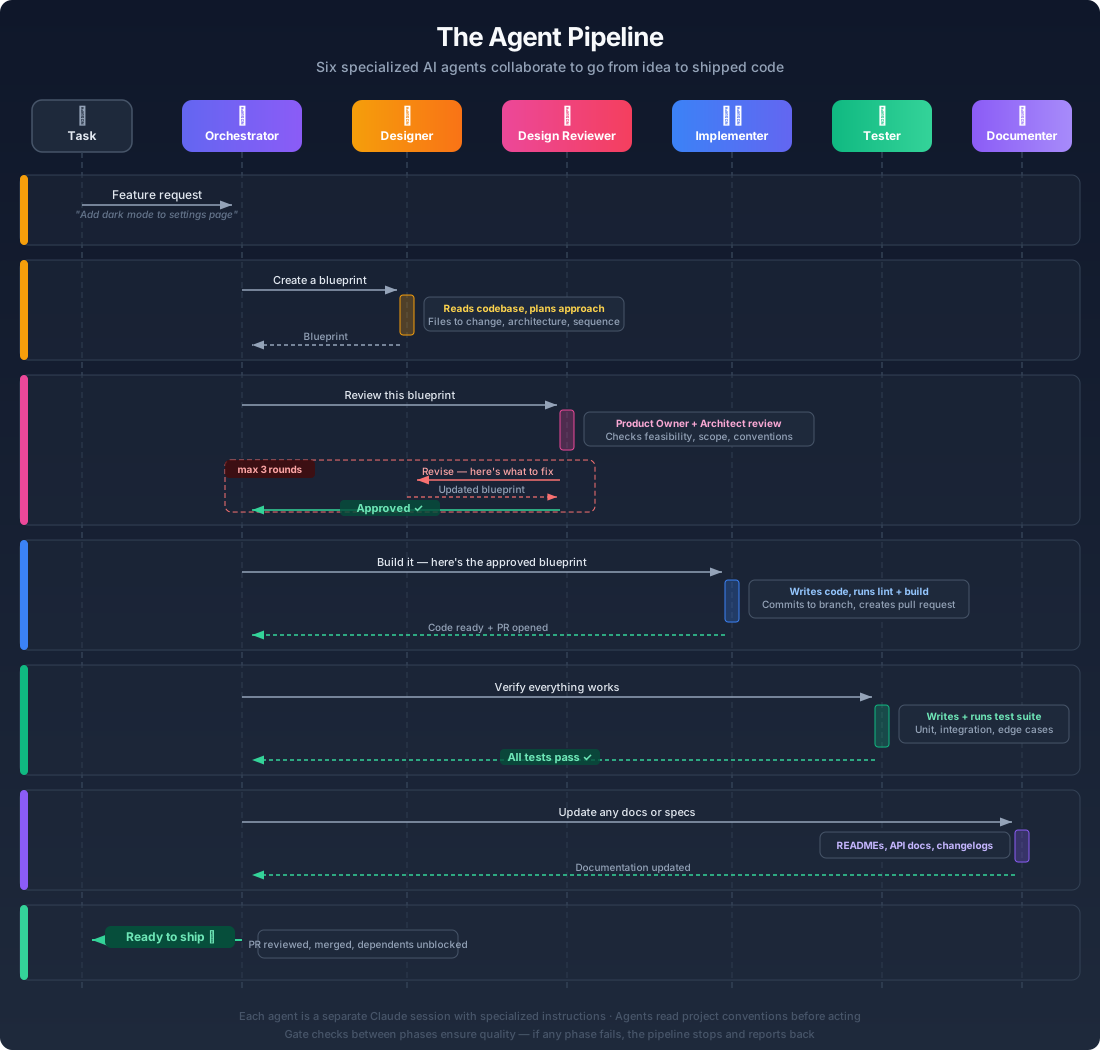
The Pipeline: Quality Gates, Not Blind Trust
The pipeline isn't a linear sequence. It has feedback loops built in — because the most important lesson in autonomous AI development is that agents need constraints, not freedom.
The Design Reviewer can send the Designer back to the drawing board — up to three times. If the blueprint isn't solid, it doesn't move forward. The Code Reviewer does the same with the Implementer. If the pull request doesn't meet standards, the feedback goes back, the code gets revised, and the review happens again. Nothing ships without passing quality gates.
Different task types get different pipelines:
| Task Type | Pipeline |
|---|---|
| Feature | Designer → Design Reviewer → Implementer → Tester → Documenter → Code Reviewer → Merge |
| Bugfix | Implementer → Tester → Documenter → Code Reviewer → Merge |
| Specification | Spec Writer creates phased GitHub issues as an implementation plan — no code written |
This is deliberate. A bug doesn't need a design phase. A specification doesn't need an implementer. The orchestration layer matches the workflow to the work.
The Architecture
Under the hood, Composer is a full-stack TypeScript application running as a persistent service on macOS.
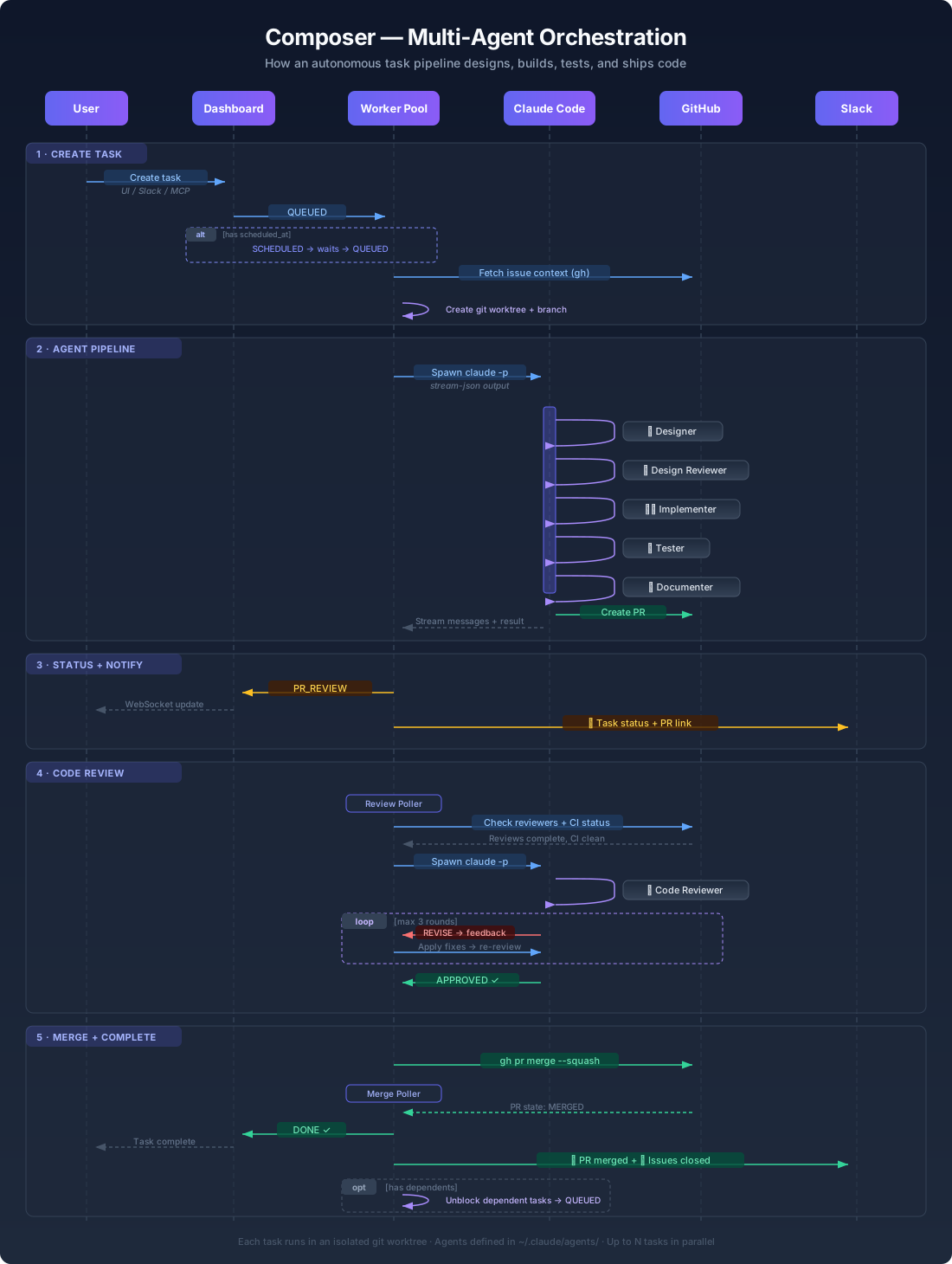
System Overview
React 19 + Vite (Dashboard)
    ↓ WebSocket + REST
Express + ws (Orchestration Server)
    ↓
    ├─ SQLite (WAL mode)
    │  └─ Tasks, messages, events, artifacts, prompts, projects
    ├─ Worker Pool (spawns claude/gemini sessions)
    ├─ Git Worktree Manager (isolated branches per task)
    ├─ Code Review Poller (auto-review dispatcher)
    ├─ Merge Poller (PR merge detection → task completion)
    ├─ Artifact Watcher (blueprint + review collection)
    ├─ Quota Manager (Anthropic API, auto-throttling)
    ├─ Slack Service (Socket Mode bot)
    ├─ Update Service (self-update from git)
    └─ MCP Server (19 tools, HTTP/SSE + STDIO transports)
Every task runs in an isolated git worktree — a fresh branch with its own working directory. No task can interfere with another. No merge conflicts between parallel agents. When the task completes, the worktree is cleaned up automatically.
Tech Stack
Backend
- Node.js with Express — REST API (56+ endpoints) + WebSocket server
- SQLite with better-sqlite3 — WAL mode for concurrent reads during writes
- TypeScript throughout — shared type definitions across all packages
Frontend
- React 19 with Vite — Kanban dashboard with real-time updates
- WebSocket — live streaming output from running agents
- Inline styles — no CSS framework dependency
Infrastructure
- npm workspaces — monorepo with shared, server, web, and MCP packages
- macOS LaunchAgent — runs as a system service, auto-restarts on crash
- Git worktrees — process isolation for parallel task execution
The Real-Time Dashboard
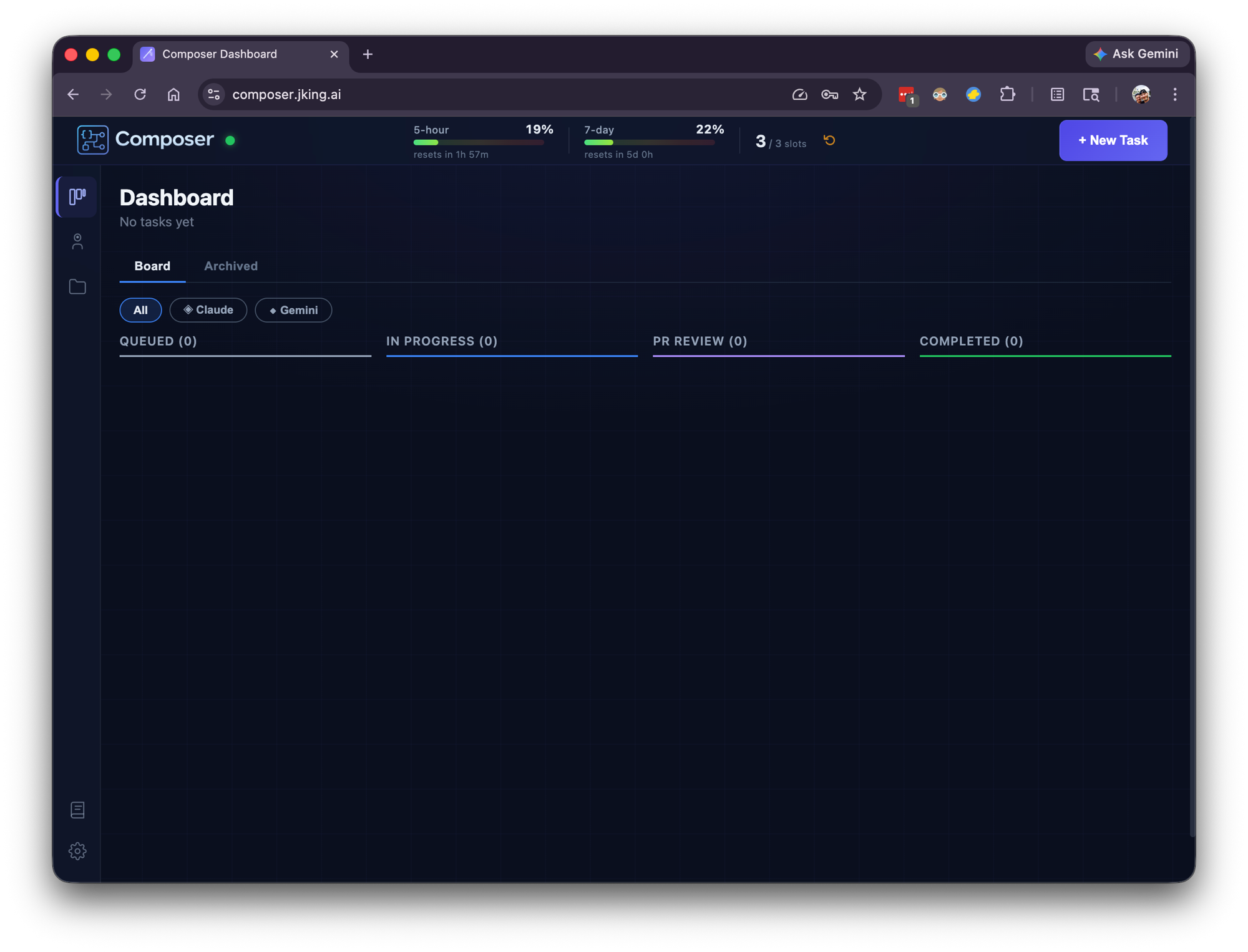
Composer's dashboard is a Kanban board showing every task's journey through the pipeline:
QUEUED → IN_PROGRESS → PR_REVIEW → DONE
With additional states for edge cases: BLOCKED (agent hit an external dependency), FAILED (something went wrong), SCHEDULED (waiting for a future time), WAITING (dependencies not yet met).
Every running task streams its output live to the dashboard via WebSocket. You can watch your AI team work in real time — see the Designer reading your codebase, the Implementer writing code, the Code Reviewer leaving feedback on a pull request.
Each task detail page includes:
- Live message stream — every message from the AI session as it happens
- Activity timeline — color-coded event log (created, status changes, retries, reviews, merges)
- Prompt history — the full assembled prompt for every phase, including revision rounds
- Artifacts — collected blueprints and code review documents
- Cost tracking — per-run token usage with input, output, and cache breakdowns
Quota Management: A First-Class Engineering Problem
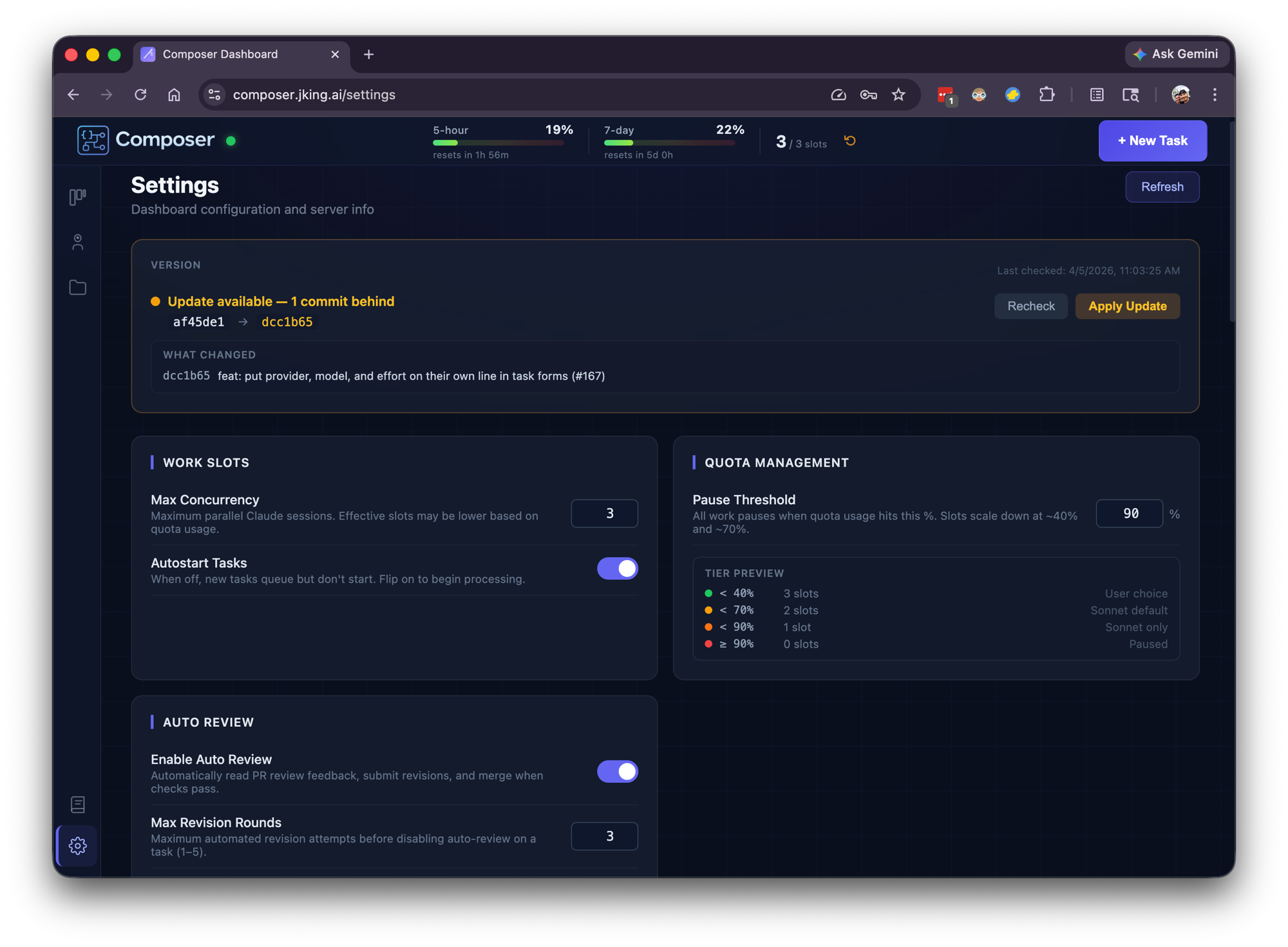
Running on Claude Max (and now Gemini too), Composer operates within usage windows — a 5-hour rolling window and a 7-day window. Managing this turned out to be a genuine engineering challenge, not an afterthought.
Composer polls the quota API and makes real-time decisions:
- When usage is low: runs up to 3 tasks in parallel
- As quota fills: automatically throttles to 2, then 1 concurrent task
- When quota is full: pauses all work, shows countdown timers on queued tasks
- When the window resets: resumes automatically, no intervention needed
The quota gauge is always visible in the dashboard header — a live percentage with time-until-reset. Queued tasks show their own countdown: "Quota full — starts in 2h 14m."
This adaptive throttling means Composer extracts maximum value from the subscription without ever hitting hard limits or wasting capacity. It runs as aggressively as the quota allows and backs off gracefully when it can't.
Task Chains and Dependencies
Real software work isn't isolated tickets. Features have dependencies. Database migrations need to land before the API that uses them. Composer handles this with two mechanisms:
Chains
Ordered sequences where Task A must complete before Task B starts, which must complete before Task C starts. Create a chain and Composer handles the sequencing automatically.
Dependency Graphs
Arbitrary DAG support for more complex relationships. A task can be blocked by multiple upstream tasks, and it won't start until all of them reach a terminal state.
Terminal status cascade prevents orphaned work — if a task in a chain FAILS or is CANCELLED, all downstream dependents are automatically cancelled. A periodic consistency sweep every 60 seconds prevents deadlocks. When a PR merges, the Merge Poller detects it and unblocks the next task in the chain.
Crash Recovery and Resilience
Composer runs 24/7. Things go wrong — processes crash, machines reboot, sessions time out. The system is designed to recover gracefully:
- Graceful shutdown (SIGTERM/SIGINT) — in-progress tasks are automatically re-queued for resumption
- Session recovery — tasks with a session ID resume via
--resume, preserving conversation context - Orphan detection — tasks that lost their process are identified and retried fresh
- Auto-resume cap — maximum 3 resume attempts per task prevents infinite loops
- Quota gate — recovered tasks wait for the first quota update before starting, preventing a thundering herd on restart
- Worktree persistence — git worktrees survive reboots (stored in
~/.composer-dashboard/data/)
The macOS LaunchAgent ensures Composer itself restarts automatically if the process dies. From a cold boot, the system recovers to full operation without any manual intervention.
Operating Composer: Three Interfaces
The Dashboard
The primary interface. Create tasks, monitor progress, review results, manage settings. Real-time Kanban board with live streaming from every active agent.
Slack Bot
For when you're away from the desk. Composer's Slack bot uses Socket Mode (no public URL needed):
- Slash commands:
/taskto create,/tasksto list,/quotato check usage - DM conversations: natural language task creation and status checks
- Auto-notifications: task status changes, PR events, quota warnings
- Scheduled task alerts: reminders when scheduled work is about to start
Tokens are stored securely in the macOS Keychain.
MCP Server (19 Tools)
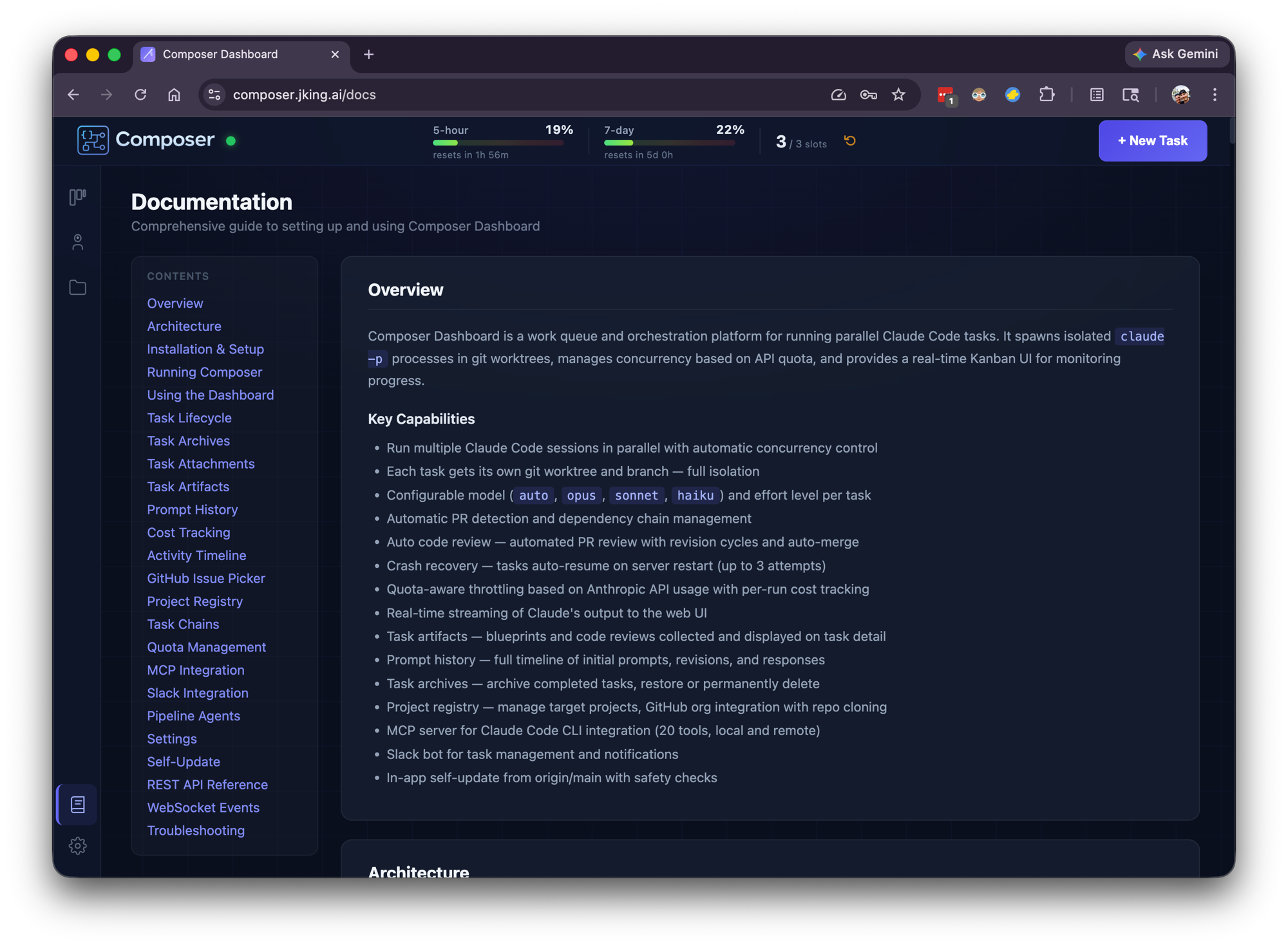
For operating Composer from within other AI sessions. The MCP server exposes 19 tools across two transports:
- STDIO transport — spawned by Claude Code for local CLI integration
- HTTP/SSE transport — integrated into the dashboard server for remote access
From any Claude Code session, you can create tasks, check status, retry failures, respond to blocked tasks, manage chains, and query quota — all without leaving your current conversation.
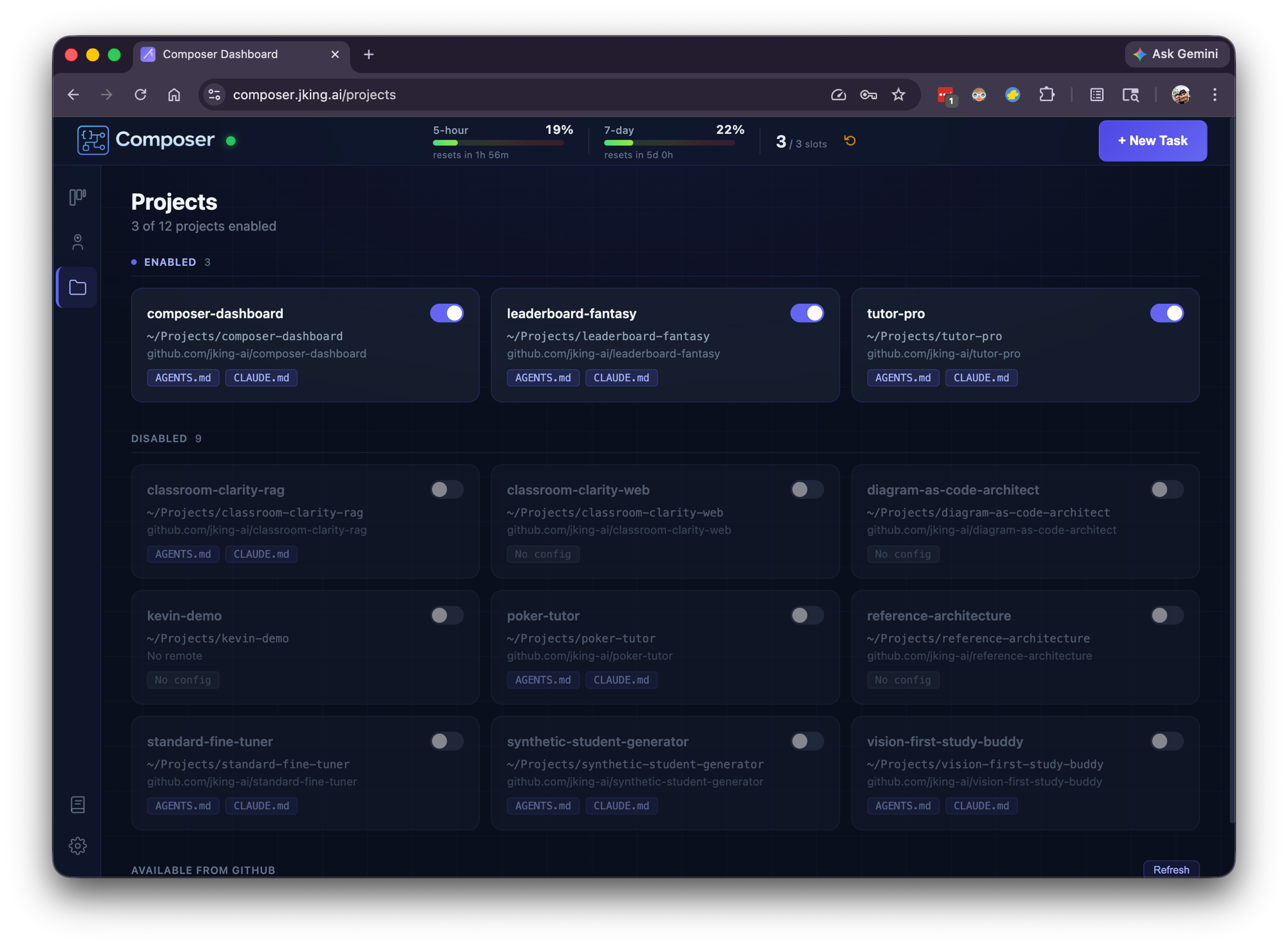
GitHub Context Pre-Fetch
When a task references GitHub issues (org/repo#123, project#42, #15), Composer automatically resolves them before the agent starts work. Issue titles, descriptions, labels, and linked PRs are injected as markdown context into the agent's prompt.
Agents never need to manually fetch issue information. They start every task with full context already loaded.
Multi-Provider Support
Composer isn't locked to a single AI provider. Tasks can be assigned to different models based on complexity and cost:
| Provider | Models | Use Case |
|---|---|---|
| Anthropic | Opus, Sonnet | Primary development — design, implementation, review |
| Gemini 3.1 Pro, 3 Flash, 3.1 Flash Lite, 2.5 Pro, 2.5 Flash, 2.5 Flash Lite | Alternative provider with multiple model tiers |
An "auto" model option defers to the agent's own configuration, letting each agent type use its preferred model. The worker pool handles provider differences transparently — the orchestration layer doesn't care which model is doing the work.
Self-Update
Composer can update itself without manual intervention:
- Dashboard shows an update banner when new commits are available on
origin/main - One click triggers a pull, rebuild, and service restart
- Safety guards block updates during active tasks to prevent data loss
- The macOS LaunchAgent handles the restart seamlessly
This matters because Composer is actively developed — often by Composer itself.
The Moment It Built Itself
This is the story that captures what Composer really is.
I needed an Activity Timeline feature — a way to see every event in a task's lifecycle as a real-time, color-coded audit trail. I wrote a detailed specification covering database schema, API endpoints, WebSocket events, and a React timeline component. Four implementation phases, filed as GitHub Issue #22.
Then I opened Composer's dashboard and created a task: "Implement Issue #22."
Composer's Designer read the spec and the codebase. The Design Reviewer approved the approach. The Implementer wrote the code — new database table, event logger, 15+ instrumentation points across the backend, REST endpoints, WebSocket broadcasting, and a full React timeline component. The Code Reviewer approved the PR. The Tester added tests. The Documenter updated the docs.
Then I created one more task: "Pull latest, build, and restart the service."
It worked. Composer pulled its own updated code, rebuilt itself, and restarted. When the dashboard came back up, there was a brand new Activity Timeline on every task detail page — including the task that had just built it.
Building the tool that builds your tools creates a compounding productivity loop. Every improvement to Composer makes every future task faster. Every feature it ships for itself makes it more capable of shipping features for everything else.
Read the full story in My Remote Agent Experiment: From Cloud Agents to My Own AI Dev Team.
Platform Metrics (First 23 Days)
Composer has been running in production since March 2026. Here's what the first 23 days looked like:
| Metric | Value |
|---|---|
| Tasks created | 184 |
| Pull requests opened | 127 |
| Repositories managed | 7 |
| Tasks auto-reviewed | 132 |
| Total tokens processed | 756.9M |
| Total messages | 43,316 |
| Average throughput | ~8 tasks/day |
| Uptime | 24/7 |
By Project
| Project | Tasks |
|---|---|
| Composer Dashboard (itself) | 83 |
| Leaderboard Fantasy | 47 |
| Vision-First Study Buddy | 19 |
| TutorPro | 10 |
| Other repos | 25 |
127 pull requests autonomously created, reviewed, and merged across 7 repositories. The system runs continuously, picking up work as it's queued, throttling based on quota, and resuming after any interruption.
Lessons Learned
Agents Need Constraints, Not Freedom
The instinct is to give AI agents maximum autonomy and let them figure it out. That's wrong. The feedback loops — Design Reviewer sending blueprints back, Code Reviewer rejecting pull requests — are what make autonomous work reliable. Without quality gates, agents produce plausible-looking code that slowly degrades. With gates, they produce production-quality software that passes real review.
The constraint isn't a limitation. It's the architecture.
The Compounding Productivity Loop
When your tool improves itself, the returns compound. Composer's first task was slow and rough. By task 100, the orchestration was smoother, the prompts were refined, the error handling was battle-tested — all because Composer had been iterating on itself the entire time. Every improvement makes every future task faster.
Quota Management Is Real Engineering
Token quotas aren't just a billing concern. They're a resource scheduling problem with rolling windows, variable consumption rates, and competing priorities. Treating quota as a first-class system constraint — with adaptive throttling, countdown timers, and automatic recovery — turned what could have been constant manual babysitting into a system that runs itself.
Future Roadmap
- Expanded provider support — deeper Gemini integration, exploring additional providers to give each agent type its optimal model
- Visual and UI testing — the biggest unsolved gap in agentic development; exploring browser automation for end-to-end testing
- Distribution and packaging — exploring install scripts, Docker images, and npm packages to make Composer easier to run for others
- Onboarding and setup — streamlined first-run experience for new users and projects
- Productizing for trusted network — sharing Composer with other developers and teams, refining the multi-user experience
The Real Takeaway
Composer is a bet on where software development is heading. Not "AI writes code" — we're already past that. The next frontier is AI manages the entire software development lifecycle, from design through review through deployment, with human oversight at the strategic level.
Today, I describe what I want built and review the results. The agents handle the rest — designing, implementing, testing, documenting, reviewing, and merging. The system runs 24/7, manages its own resources, recovers from failures, and improves itself.
A one-person AI software company. Running in production. Shipping code while I sleep.
Interested in seeing Composer in action? Demos available on request — get in touch.
Want the backstory? Read My Remote Agent Experiment: From Cloud Agents to My Own AI Dev Team.